Energy Auditing Software for Commercial Buildings: What Lighting Retrofit Teams Actually Need
- LumaQuote

- May 11
- 10 min read
Commercial energy audits often start with a simple tool: a spreadsheet, a checklist, a PDF form, or a basic audit app. That can work for early site notes.
But for lighting retrofit teams, the bigger challenge is not just collecting audit data. The real challenge is turning that data into savings estimates, rebate assumptions, installation costs, and a customer ready proposal without rebuilding the same work manually every time.
That is where energy auditing software starts to matter.
Quick answer
Energy auditing software for commercial buildings should help teams collect site data, organize fixture level audit records, calculate estimated savings, track rebate assumptions, estimate installation costs, and turn the audit into a clear proposal.
A basic energy audit app may help with field notes. A stronger workflow helps connect the audit to the quote and proposal.
What energy auditing software means in a commercial building workflow
Energy auditing software can mean different things depending on the user.
For some teams, it means a tool for collecting building data. For others, it means software for benchmarking energy use, documenting equipment, calculating savings, or preparing reports.
For lighting retrofit teams, the definition is more specific.
The software needs to support the path from field audit to retrofit proposal.
That means it should help with more than note taking.
Workflow area | What the software should help with |
Site audit | Organize rooms, areas, fixture types, quantities, notes, and photos |
Existing conditions | Record current wattage, fixture type, operating hours, and location |
Retrofit recommendations | Match existing fixtures with proposed LED replacements or controls options |
Savings estimates | Use utility rates, wattage changes, and operating assumptions |
Rebates | Track program notes, eligibility assumptions, and estimated incentives |
Installation costing | Account for labour, lift access, disposal, materials, and exclusions |
Proposal output | Turn audit data into a customer facing proposal |
This is why a generic audit tool is often not enough for commercial lighting work.
A lighting retrofit proposal depends on accurate fixture data, clear assumptions, and a clean handoff from the person doing the audit to the person preparing the quote.
For teams evaluating commercial energy audit software, the key question is simple:
Will this tool help us move from audit to proposal faster, or will we still need to rebuild everything in a spreadsheet?
Why commercial lighting audits need more than a basic energy audit app
A basic energy audit app can be useful.
It may help a field person collect notes, take photos, and document what they see during a walkthrough. For a simple inspection, that may be enough.
But lighting retrofit work usually needs more structure.
A commercial lighting audit is not only about recording what is in the building. It also has to support product recommendations, savings calculations, rebate review, installation planning, and proposal preparation.
For readers who want the basics first, we also explain what is a lighting audit and how it fits into retrofit planning.
Basic energy audit app | Commercial lighting retrofit workflow |
Collects general notes | Needs fixture level records |
Stores photos | Needs photos tied to rooms, areas, and fixture types |
Captures site observations | Needs recommendations and quote assumptions |
Helps document conditions | Needs savings, rebates, and proposal output |
Works for inspection style tasks | Needs to support sales and estimating |
The issue is not that audit apps are bad. The issue is that many of them stop too early in the workflow.
If the audit data still needs to be copied into Excel, rewritten into a proposal, and manually connected to rebates or installation costs, the team has not solved the real problem. It has only moved the first step onto a screen.
The main problem: audit data gets separated from the proposal

This is where commercial retrofit teams lose time.
The audit may happen in one place. The quote may happen somewhere else. The final proposal may be built in a separate document. Rebate notes may live in emails, utility files, or another spreadsheet. That creates a disconnected workflow.
A common process looks like this:
Step | Where the work often happens |
Field audit | Paper form, app, notes, or spreadsheet |
Fixture counts | Excel or Google Sheets |
Product recommendations | Separate product list or supplier quote |
Savings calculations | Spreadsheet formulas |
Rebate notes | Utility documents, email, or manual notes |
Installation costing | Estimator spreadsheet |
Proposal | Word, PDF, Canva, Google Docs, or proposal software |
Each handoff creates room for delays.
Someone has to clean up the audit. Someone has to check the numbers. Someone has to format the proposal. Someone has to make sure the final document matches what was actually found on site.
That is manageable for a small job.
It becomes painful when the team is quoting commercial retrofit projects repeatedly.
This is the same reason many teams eventually move beyond templates. A spreadsheet can collect data, but once it becomes the audit form, calculator, rebate tracker, install estimate, and proposal builder, it starts doing too much.
Related guide: Lighting Audit Software vs Templates
What to look for in energy auditing software for commercial buildings
The best energy auditing software for commercial lighting work should make the workflow more connected.
It should not only help you collect data. It should help you use that data.
Here are the features that matter most for lighting retrofit teams.
Feature | Why it matters |
Room by room audit structure | Keeps commercial building data organized |
Fixture type records | Helps track existing lighting conditions accurately |
Existing and proposed wattage fields | Supports savings calculations |
Operating hour assumptions | Helps make estimates more realistic |
Utility rate fields | Connects energy savings to cost savings |
Fixture library | Speeds up audit entry and retrofit recommendations |
Rebate notes | Keeps incentive assumptions tied to the project |
Controls opportunity fields | Helps identify optional upgrade opportunities |
Installation costing | Connects the audit to the quote |
Branded proposal output | Reduces manual document work |
Room by room audit structure
Commercial buildings are rarely simple.
A single project may include offices, warehouses, corridors, exterior lighting, parking areas, mechanical rooms, production spaces, and common areas.
If the audit is not organized by area, the data gets hard to review.
A good workflow should make it easy to see what was found in each space, what is being recommended, and what assumptions apply.
Fixture level data
Lighting retrofit work depends on fixture details.
A proposal is stronger when it can show the existing fixture type, quantity, wattage, and recommended replacement. Without that structure, the customer has to trust a number without seeing the logic behind it.
That is one of the main differences between general energy audit tools and lighting audit software.
Lighting audit software needs to understand fixture based workflows.
Savings assumptions
Savings estimates should be easy to explain.
At minimum, the workflow should support existing wattage, proposed wattage, quantity, operating hours, and utility rate assumptions.
The proposal does not need to overwhelm the customer with every calculation, but it should be clear enough that the numbers feel credible.
For a deeper breakdown of the numbers behind payback, read our guide to lighting retrofit ROI.
Rebate notes
Rebates can help a project move forward, but they need to be handled carefully.
The software should help track rebate assumptions, program notes, estimated incentive amounts, and approval status where applicable.
It should also make it clear when a rebate is only an estimate.
Final eligibility depends on the utility program, location, product requirements, timing, and approval process.
Installation costing
A lighting retrofit quote is not just fixtures. Installation assumptions matter.
Labour, lift access, disposal, materials, controls setup, after hours work, exterior access, and exclusions can all affect the final proposal.
Good lighting retrofit software should help keep those assumptions connected to the audit and proposal instead of leaving them in a separate file.
Proposal output
The final proposal is where the work becomes visible to the customer.
A clean proposal should explain the existing condition, recommended retrofit, estimated savings, rebate assumptions, installation scope, pricing, and next steps.
That is the real value of a connected audit to proposal workflow.
It reduces the amount of manual cleanup between the site visit and the customer facing document.
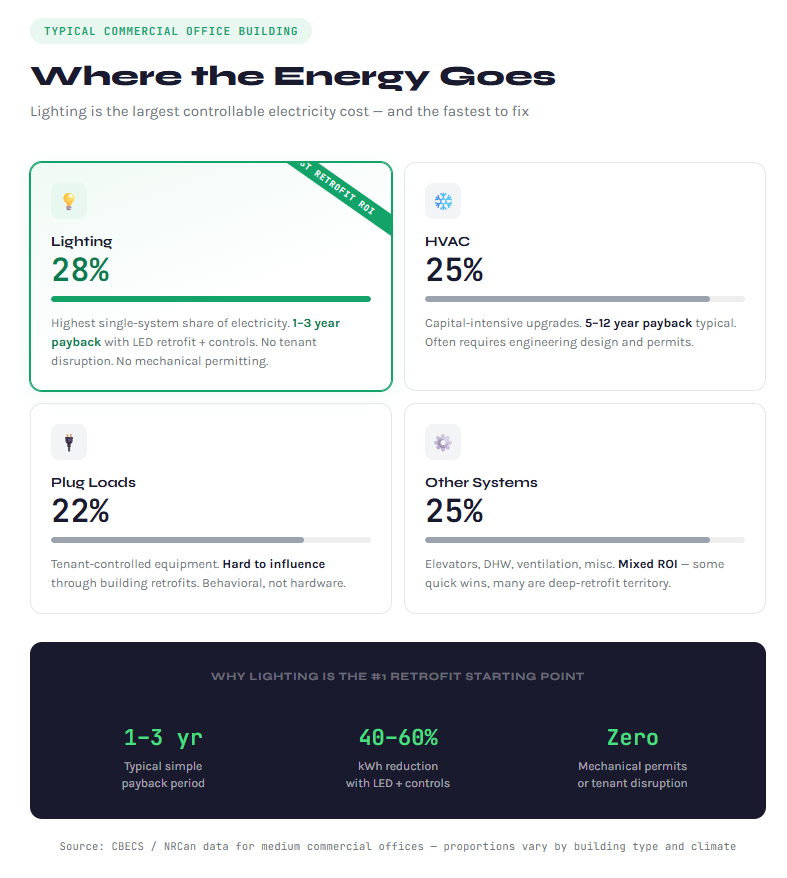
Energy auditing software vs lighting audit software
Energy auditing software is a broad category.
It can cover building envelope audits, HVAC reviews, equipment surveys, utility benchmarking, carbon reporting, lighting audits, and capital planning.
Lighting audit software is more specific. It focuses on the fixture level workflow that lighting retrofit teams need to quote projects accurately and consistently.
Term | Best fit |
Energy auditing software | Broader commercial building audit workflows |
Energy audit app | Field data collection, photos, and site notes |
Lighting audit software | Fixture level audit records and lighting recommendations |
Lighting retrofit software | Audit, savings, rebates, installation costs, and proposal workflow |
Proposal software for contractors | Customer facing quote and proposal output |
For a lighting retrofit company, the best tool is usually not a generic audit app.
The better fit is software that understands how lighting projects are actually quoted.
That means fixture data, proposed replacements, operating hours, utility rates, rebate assumptions, labour costs, and proposal output should all be connected.
A general app may help with inspection notes.
A lighting focused workflow helps the team move from audit to quote.
That difference matters when the goal is to win retrofit projects, not just document a building.
For teams comparing tools, it helps to look at both lighting audit software and lighting retrofit software through the same lens:
Can the software carry the project from field data to customer approval?
Where commercial LED retrofit teams lose time
Commercial LED retrofit teams usually do not lose time because they do not understand lighting. They lose time because the workflow is fragmented.
The audit, quote, rebate review, install estimate, and proposal often sit in different places.
That creates repeated manual work.
Bottleneck | What usually causes it |
Re entering audit data | Field notes do not connect to quoting |
Rebuilding savings estimates | Calculations live in separate spreadsheets |
Chasing rebate details | Program notes are not tied to the project |
Pricing install work manually | Labour and access assumptions sit in another file |
Cleaning up proposals | Customer ready documents require extra formatting |
Revising the scope | Changes have to be updated in multiple places |
A commercial LED retrofit project may involve dozens or hundreds of fixtures across different spaces. If the audit data is not structured from the beginning, the proposal stage becomes slower.A small mistake in quantity, wattage, operating hours, or rebate assumptions can also create confusion later.
This is why connected software matters.
The goal is not just to make the audit look cleaner. The goal is to reduce the number of times the team has to touch the same data before the proposal is ready.
For teams focused on commercial LED retrofit work, this can be the difference between sending a proposal quickly and letting the opportunity sit while the numbers are rebuilt.
When spreadsheets are still enough
Spreadsheets are not the enemy. For some teams, they are still enough.
A spreadsheet may work well when the project is small, the fixture count is simple, and one person is handling the audit, quote, and proposal.
It may also be enough when the customer only needs a rough estimate or when the team is still testing lighting retrofit work as a service.
Spreadsheet may be enough when | Why |
The job is small | There are fewer areas, fixtures, and assumptions |
One person owns the whole process | There are fewer handoff issues |
No rebate workflow is involved | There are fewer outside requirements |
The proposal is simple | The document does not need much formatting |
The team only quotes occasional retrofits | The manual work is not yet a major bottleneck |
The problem starts when the spreadsheet becomes more than a spreadsheet.
Once it becomes the audit form, calculator, rebate tracker, install estimate, pricing sheet, and proposal source, it becomes harder to control.
That is usually the point where teams start looking for software.
If your spreadsheet is starting to act like your audit form, calculator, quote builder, and proposal system, this comparison of Excel vs lighting proposal software is worth reading next.
When to move from spreadsheets to energy auditing software
The right time to move is not based on company size alone.
It is based on workflow pressure.
If the team is spending too much time between site visit and proposal, the current process is probably too manual.
Signs that it may be time to move to software include:
Sign | What it usually means |
You quote multiple retrofit projects per month | Repeatable workflow matters more |
You rebuild the same spreadsheet for every job | The process is not scalable |
Audit data needs cleanup before quoting | Field data is not structured enough |
Proposal creation takes too long | The quote and proposal are disconnected |
Rebate notes are handled manually | Assumptions are easy to lose |
Installation costs sit in a separate file | Scope and pricing are disconnected |
Different team members format proposals differently | The customer experience is inconsistent |
For contractors and retrofit teams, the issue is not whether Excel can calculate savings.
It can.
The issue is whether Excel can support the full commercial workflow without slowing down the team.
That workflow includes audit data, fixture recommendations, savings estimates, rebate assumptions, installation costing, customer presentation, and follow up.
When those pieces are disconnected, software becomes easier to justify.
How LumaQuote fits the workflow

LumaQuote is built for contractors, lighting retrofit companies, distributors, and energy teams that need to move from commercial lighting audit to quote to proposal with less manual work.
Instead of treating the audit, estimate, rebate notes, and proposal as separate files, LumaQuote helps keep the workflow connected.
Teams can organize project information, capture fixture data, build retrofit recommendations, include savings assumptions, account for rebates where applicable, estimate installation costs, and prepare a branded proposal.
The value is not just cleaner data.
The value is a faster path from field audit to customer ready proposal.
That matters when teams are quoting repeat commercial retrofit work and need consistency across projects.
To see how the workflow is structured, visit the LumaQuote platform or review the main features.
Bottom line
Energy auditing software for commercial buildings should do more than collect notes.
For lighting retrofit teams, the real value is connecting the audit to the quote.
A basic energy audit app may help in the field, but it often stops before the hardest part of the workflow begins.
The stronger approach is a connected system that supports fixture data, savings assumptions, rebate tracking, installation costing, and proposal output.
That is what helps teams move faster, reduce manual work, and present retrofit projects more clearly to customers.
FAQ: Energy Auditing Software
What is energy auditing software?
Energy auditing software helps teams collect building audit data, organize findings, calculate estimated savings, and prepare recommendations.
For lighting retrofit teams, it should also support fixture records, proposed replacements, rebate assumptions, installation costs, and proposal output.
What is the difference between an energy audit app and energy auditing software?
An energy audit app usually focuses on field data collection, notes, and photos.
Energy auditing software usually supports more of the workflow, including calculations, recommendations, reporting, and proposal preparation.
What should energy auditing software include for commercial buildings?
Energy auditing software for commercial buildings should include site details, area level audit data, fixture or equipment records, operating hours, utility rates, savings assumptions, rebate notes, project costs, and clear reporting or proposal output.
Can energy auditing software help with lighting retrofits?
Yes.
For lighting retrofit teams, energy auditing software can help organize existing fixture data, proposed replacements, energy savings, rebate assumptions, installation costs, and proposal documentation.
Is Excel enough for commercial energy audits?
Excel can work for simple audits.
It becomes harder to manage when projects involve multiple areas, fixture types, rebate assumptions, installation costs, and customer ready proposals.
Does energy auditing software calculate rebates?
Energy auditing software can help organize rebate assumptions and estimated incentives.
Final rebate eligibility depends on the utility program, location, product requirements, timing, and approval process.
Who uses commercial energy auditing software?
Contractors, lighting retrofit companies, distributors, ESCOs, facility teams, and energy consultants use commercial energy auditing software to collect audit data, estimate savings, prepare recommendations, and support project proposals.


