Lighting Audit Software for Contractors: What It Should Actually Help You Do
- LumaQuote

- Apr 10
- 17 min read
Updated: May 4
Most contractors do not struggle to complete a lighting audit. The slowdown happens after the walkthrough, when fixture counts, notes, pricing, rebates, and proposal details have to be rebuilt across spreadsheets and separate documents.
That is why lighting audit software for contractors should do more than capture site data. It should help your team move from audit to retrofit quote faster, with fewer handoff errors and a cleaner proposal at the end.
If you are comparing tools, it helps to look at the full workflow, not just the site survey screen. A strong platform should connect the audit to the rest of the job, including the retrofit quoting workflow and proposal output. See how this fits into broader lighting audit software, lighting survey software, and lighting retrofit software workflows.
Why manual lighting audits slow down retrofit sales

Manual audits create drag in places that are easy to underestimate. A contractor might finish the site visit in two hours, then spend another day or two translating that information into something usable for estimating and sales.
Re entering fixture counts into quote sheets
This is one of the biggest hidden costs in the audit process.
A technician counts existing fixtures by area. Later, someone in the office re-enters the same counts into a spreadsheet or quoting template. Then those same counts may get copied again into a client-facing proposal. Every extra handoff creates another chance for mismatched quantities, missing rooms, or pricing errors.
What this looks like in practice
A small office or retail project can easily include:
Audit item | Example volume |
Areas or rooms | 12 to 30 |
Fixture lines captured | 25 to 80 |
Product replacements quoted | 10 to 40 |
Proposal tables rebuilt manually | 3 to 6 |
Even when each step only takes a few minutes, the total time adds up fast. More importantly, every manual transfer increases the chance that the final quote no longer matches the field reality.
Lost site notes and photos
Photos on a phone. Notes in a notebook. Fixture details in a spreadsheet. Markups in an email thread.
This is a common setup, and it creates a predictable problem. By the time the estimator or salesperson builds the quote, the context from the walkthrough is already fragmented. Which storage room had the high bays. Which classroom had emergency fixtures. Which corridor had odd mounting conditions. Which panel note affected install scope. Those details matter, but they are often stored in places that do not travel with the audit.
A good lighting audit app should keep field notes, area context, and fixture records together. If the photos and notes are detached from the actual audit line items, the team is still relying on memory and cleanup work.
Inconsistent hours and savings assumptions
Many retrofit quotes break down because baseline assumptions are not handled consistently.
One estimator uses 3,000 annual hours. Another uses 4,200. One project includes occupancy assumptions for storerooms. Another does not. Someone updates wattage on one tab but forgets to update the savings summary on another. These are not small issues. They change ROI, rebate estimates, and proposal credibility.
Common assumption problems in manual workflows
Operating hours vary by estimator instead of by building use
Existing wattages are guessed instead of templated
Controls opportunities are handled inconsistently
Savings summaries do not match quoted replacements
Rebate schedules need to be rebuilt separately
This is where disconnected spreadsheets start to hurt trust. Buyers may not catch every technical detail, but they notice when the quote feels stitched together.
Proposal delays after the walkthrough
Speed matters. A contractor who gets a clear proposal out quickly usually has an edge.
When the audit lives in one place, pricing in another, and the proposal in a third, delays are almost guaranteed. The issue is not just admin time. It is sales timing. The longer the gap between walkthrough and proposal, the colder the opportunity becomes.
A simple comparison makes the point:
Process step | Manual workflow | Connected software workflow |
Capture fixture counts | Field notes or spreadsheet | Structured audit by area |
Build retrofit scope | Re-entered later | Created from audit data |
Add pricing | Separate quote file | Editable in workflow |
Build proposal | Manual formatting | Generated from same project |
Typical result | Slower turnaround, more cleanup | Faster quoting, fewer handoff errors |
Contractors do not need software that only helps them “collect data.” They need software that helps them move from walkthrough to decision-ready quote with less rework.
If your team is currently using Excel, Google Sheets, or PDF forms, this breakdown of lighting audit software vs templates explains when a simple template starts slowing down the audit to proposal workflow.
What lighting audit software should include
The best tools are not the ones with the longest feature list. They are the ones that reduce field friction and make downstream quoting easier.
Fast area based fixture capture
Audits should be built around how contractors actually walk a building.
That usually means area by area, not one giant flat list. Warehouses, offices, corridors, washrooms, parking areas, and exterior zones each have different fixture conditions, operating patterns, and retrofit logic. Area-based capture makes the audit easier to review, easier to price, and easier to explain in the final proposal.
This structure also improves proposal clarity because area summaries can roll directly into the client output instead of being manually reorganised later.
Fixture family templates
No contractor wants to rebuild the same fixture logic on every project.
Good software should let you standardise common fixture families such as 2x4 troffers, strip fixtures, wall packs, high bays, and exterior poles. That means less typing, more consistency, and fewer errors when different team members work on similar projects.
A useful template might include
Existing fixture type
Lamp or driver configuration
Existing wattage
Default replacement type
Notes for mounting or installation
Common rebate category mapping
That kind of structure saves time in the field and makes the move into lighting retrofit software much smoother. It also keeps recommendations more consistent across projects and sales reps. For related workflow context, see lighting retrofit software and platform.
Wattage and runtime assumptions
Contractors need editable assumptions, not rigid calculators.
The platform should make it easy to apply sensible defaults, then override them when the building type or schedule requires it. A school, warehouse, retail store, and 24 hour facility should not all run on the same assumption set.
This matters because the audit does not stop at counts. It feeds energy savings, cost justification, and rebate math. If the underlying wattage and runtime assumptions are hard to manage, the quote becomes harder to defend.
Area summaries
After the walkthrough, teams need a clear view of what was found without digging through dozens of individual line items.
Area summaries help answer practical questions fast:
Which rooms carry the most retrofit volume
Which areas have the biggest load reduction opportunity
Which spaces may need special install labour
Which sections should be highlighted in the proposal
This is especially useful when building an executive summary or preparing a client-facing scope document. It also makes the handoff to lighting proposal software much cleaner because the project is already organised in a format buyers can understand. You can see the proposal side of that workflow in this sample lighting retrofit proposal.
Bulk edit and duplication tools
Real projects involve repetition.
If a building has twenty similar classrooms, ten similar offices, or multiple exterior poles with the same fixture condition, software should let you duplicate and bulk edit instead of starting from scratch every time. This is not a convenience feature. It is a speed feature.
When contractors evaluate audit to proposal software, this is one of the easiest places to tell whether the platform was built around actual project workflows or around generic data entry.
A simple example:
Task | Manual method | With bulk tools |
Add 18 similar classrooms | Enter each one separately | Duplicate base area and adjust |
Update replacement fixture across 24 lines | Edit one by one | Bulk edit fixture group |
Change runtime for a building type | Update multiple tabs | Apply rule once |
The best software reduces repetitive clicks and keeps the audit aligned with the quote as changes happen.
The biggest gap is not the audit, it is the handoff
Many tools do a decent job of helping teams collect fixture data. Fewer tools help them do something useful with it immediately after the walkthrough.
That is where most retrofit workflows break.
Audit to retrofit recommendation
A completed audit should lead directly into a recommended replacement path.
That means the software should help you move from existing conditions to proposed fixtures without exporting everything into another system first. If the team still has to manually rebuild replacement logic after the audit, the handoff is weak.
In practice, contractors need to answer questions like:
Which existing fixture gets which replacement
Where a simple lamp change is enough
Where a full fixture replacement makes more sense
Which areas are better candidates for controls or advanced upgrades
This is where lighting audit software for contractors starts to overlap with lighting retrofit software. The best systems do not force a hard break between those steps. They treat the audit as the starting structure for the retrofit scope.
Audit to rebate schedule
Rebate work is another common failure point.
Field data often gets captured one way, while rebate paperwork needs to be organised another way. That forces the team to re-sort projects after the walkthrough instead of using the audit data as the foundation for incentive planning.
A stronger workflow lets the audit support rebate readiness earlier by keeping useful details tied to each fixture record, such as:
Existing and proposed wattage
Fixture category
Quantity by area
Eligibility notes
Supporting product selections
That does not mean the software should overpromise rebates. It means it should make rebate preparation more structured and less manual.
Audit to installation scope
The handoff from audit to install planning is often overlooked, but it affects margins.
A quote can look fine on paper while still missing real install considerations from the walkthrough. Lift access, ceiling height, mounting differences, occupied spaces, disposal needs, and phased work all influence labour and project execution.
If those notes stay buried in email threads or notebook pages, the install scope gets built with weak context. A better platform keeps audit observations connected to the parts of the job that affect labour, access, and sequencing.
Audit to client ready proposal
This is the outcome the client actually sees.
The buyer does not care how many spreadsheets your team touched. They care whether the proposal is clear, credible, and fast. The audit should feed that output directly, not force your team to rebuild the project summary from scratch.
That is where lighting proposal software and audit to proposal software become critical. A connected workflow gives sales teams a faster path from field data to a document that explains scope, pricing, savings, and next steps in a format clients can review without confusion.
When contractors evaluate tools, this is the question worth asking:
Can the same project move from walkthrough to proposal without being rebuilt?
If the answer is no, the handoff problem still exists.
What contractors actually need after the walkthrough
A completed audit is only useful if it helps the team build the next version of the job quickly and accurately.
Most contractors do not need more raw data after a site visit. They need software that turns field information into a usable sales and estimating workflow. That means the platform should support replacement decisions, pricing, incentives, labour, and client communication without forcing the project into four separate tools.
Recommended replacements
The first practical need is a clear proposed scope.
Once the existing fixture base is captured, the software should help the team assign recommended replacements by area, fixture family, or project standard. That recommendation process should be editable because real projects are never perfectly uniform. One warehouse may need a simple LED high bay swap. Another may need a different output package in aisles, a sensor strategy in storage zones, and a separate approach for loading areas.
What the replacement workflow should support
One to one fixture replacement mapping
Multiple replacement options where needed
Area specific recommendations
Product families tied to common existing conditions
Notes for exceptions, constraints, and client preferences
This is where a contractor starts to see the difference between basic data collection and real lighting retrofit software. A tool that only stores existing conditions still leaves the hard part undone. For more on that handoff, see lighting retrofit software and features.
Editable pricing
Pricing cannot live in a separate world from the audit.
Contractors need the ability to adjust material pricing, labour assumptions, margins, and project totals without losing the structure of the original walkthrough. If the pricing model is disconnected, every change becomes a manual exercise and every revision adds more room for error.
A useful platform should let teams:
Apply standard pricing logic across similar fixture groups
Override pricing for special cases
Update product selections without rebuilding the job
Review totals by area, category, or full project
Produce quote revisions quickly when a client asks for options
Example of what editable pricing changes
Scenario | Without connected pricing | With connected pricing |
Client asks for alternate fixture option | Rebuild quote lines manually | Swap product and refresh pricing |
Product cost changes before proposal goes out | Update spreadsheet and summary separately | Update pricing inside project |
Sales rep wants good, better, best options | Create multiple disconnected versions | Duplicate scope and adjust options |
That flexibility matters because commercial quotes rarely stay static. Buyers ask questions. Product choices change. Budget targets shift. Software should make revisions faster, not more fragile.
Rebate ready schedules
Rebate work is often one of the biggest value drivers in a retrofit proposal, but it is also where many teams lose time.
The software should help organise project data in a way that supports incentive workflows without pretending rebates are automatic. Contractors still need to confirm program rules and product eligibility. What the platform should do is make it easier to structure quantities, fixture categories, wattage reductions, and proposed product details so the rebate side is not rebuilt from scratch.
Rebate ready does not mean rebate guaranteed
That distinction matters.
A strong workflow helps the team prepare better documentation. It does not make inflated promises or assume every project will qualify exactly as expected. Good software should support the process while leaving room for program checks and revisions.
This is especially important for contractors who want to move faster without overcommitting in front of clients. A cleaner workflow supports credibility. It does not replace due diligence.
Install costing

A proposal is only as strong as the underlying job economics.
Contractors need software that reflects installation reality, not just fixture counts. That means the workflow should allow install considerations to influence scope and pricing, including:
Mounting complexity
Ceiling height
Lift or access needs
Occupied versus unoccupied work areas
Night work or phased scheduling
Disposal and removal considerations
Controls add ons where relevant
Example of why install costing matters
Two buildings may each have 100 fixtures, but the labour profile can be completely different.
Project type | Fixture count | Install complexity | Result |
Small office with easy access grid ceilings | 100 | Low | Faster install, lower labour burden |
Warehouse with high mounting and lift access | 100 | High | Slower install, higher labour burden |
If software treats those jobs as equal because the count is equal, margins get exposed.
Executive summary for the client
The final need after the walkthrough is a clear client facing summary.
Decision makers usually do not want to read through raw audit tables first. They want a clean overview that explains what was found, what is recommended, what the project may improve, and what the next step looks like.
That is why lighting proposal software matters just as much as the audit itself. The project should already be structured in a way that feeds a professional summary, not require a second round of formatting work before it is presentable.
A useful executive summary typically includes:
What was surveyed
What retrofit path is recommended
Projected reduction in connected load or energy use
Estimated incentive opportunity where applicable
Budget summary
Clear next step
You can see how that kind of output supports sales communication in this sample lighting retrofit proposal.
How LumaQuote fits the workflow
LumaQuote is built around the part contractors actually care about: getting from site data to a credible quote and proposal with less manual work.
It is not just about capturing fixture counts. It is about keeping the full project connected from walkthrough to recommendation, pricing, summary, and proposal output.
Audit
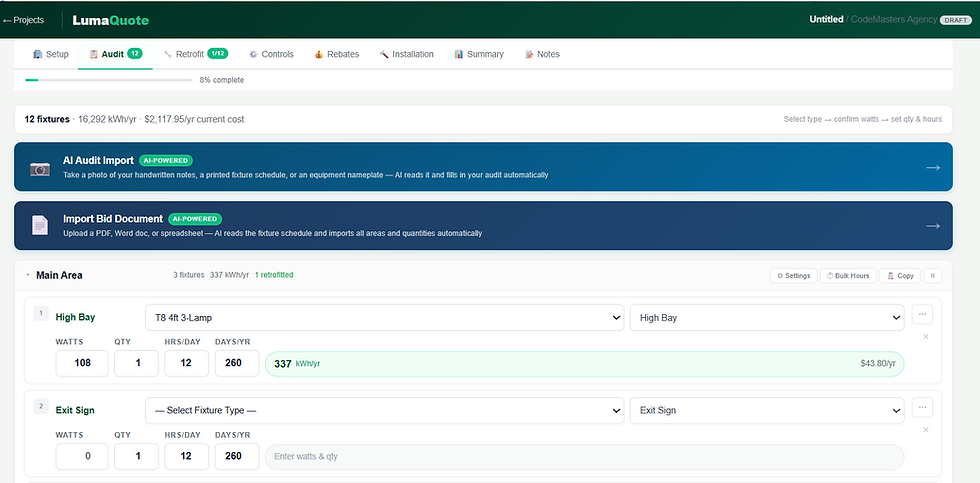
LumaQuote starts with the site survey process.
Contractors can organise projects by area, capture existing fixtures, record counts, and build a structured audit that is usable after the walkthrough. That matters because a clean audit foundation makes every downstream step easier to manage.
This is where LumaQuote connects with the needs of teams comparing lighting audit software for contractors and lighting survey software. It is designed to support field capture in a format that can keep moving through the project instead of stalling after data collection. Related pages: lighting audit software and lighting survey software.
Retrofit

Once the audit is in place, the project can move into retrofit planning.
Instead of treating the recommendation process as a separate rebuild, LumaQuote supports the transition from existing conditions to proposed replacements inside the same workflow. That helps contractors move faster and keeps scope development more consistent across projects.
Why this matters in real sales workflows
The buyer usually does not care how well the audit was stored. They care whether the contractor can turn it into a recommendation they trust.
That means software needs to help answer practical questions such as:
What gets replaced
What stays
Which areas are highest priority
Which options should be quoted first
Rebates

LumaQuote also supports the rebate side of the retrofit workflow by keeping fixture and replacement data structured for downstream use.
That does not mean rebates are automatic or guaranteed. It means the information needed to build a cleaner rebate schedule is easier to organise when the project has been structured properly from the start.
For contractors, this reduces the amount of cleanup work that usually happens between the walkthrough and the incentive paperwork stage.
Installation
Good quoting software should not stop at product selection.
LumaQuote helps keep install related thinking inside the project workflow so pricing and proposal logic reflect actual execution considerations. That is important because retrofit jobs are not won or lost on fixture tables alone. Labour, access, timing, and project complexity all affect whether the final proposal is realistic.
Summary and proposal generation

This is where a connected workflow pays off.
Because the audit, retrofit scope, pricing, and project structure stay tied together, LumaQuote can support cleaner summaries and faster proposal generation. That helps sales teams respond sooner and present work more clearly.
For contractors comparing audit to proposal software, this is the core advantage. The job does not have to be rebuilt every time it moves to the next stage. Learn more about the overall system on the platform and features pages.
Who this is best for
Not every team needs the same workflow depth, but there are several groups that benefit the most from connected audit to proposal software.
Electrical contractors
Electrical contractors quoting retrofit work need speed, structure, and flexibility.
They often manage a mix of site conditions, customer types, product options, and install requirements. A tool that keeps the audit connected to scope and pricing can save admin time and reduce quoting friction across the board.
This is especially useful for teams that have already outgrown paper forms and spreadsheets but do not want a bloated system that slows the field side down.
Lighting retrofit specialists
Specialists focused on retrofit work typically handle higher audit volume, more fixture variation, and more proposal activity.
For these teams, the value of connected software compounds quickly. A few minutes saved per area, per revision, or per proposal adds up across dozens of projects. More importantly, consistency improves. Recommendations feel more standardised, pricing is easier to manage, and proposal output becomes more credible.
Energy sales teams
Some organisations have strong sales activity but weaker operational continuity between site walkthrough and proposal generation.
Energy sales teams benefit when the platform helps standardise assumptions, present opportunities clearly, and produce client ready summaries without waiting on manual rework. That speed can matter a lot in competitive quoting situations where the first credible proposal often has an advantage.
Distributors supporting quote creation
Distributors that help contractors or end users build retrofit quotes also benefit from a connected workflow.
They often need to support fixture selections, pricing updates, and project structuring across multiple customer conversations. Software that keeps the audit, recommendation, and proposal logic tied together can reduce internal back and forth and improve turnaround times.
Quick fit guide
Team type | Why it fits |
Electrical contractors | Faster audit to quote workflow with better install context |
Retrofit specialists | Better consistency across high volume quoting |
Energy sales teams | Faster proposals and cleaner summaries for buyers |
Distributors | Easier support for quote creation and product mapping |
What to look for before choosing a platform
Contractors should not choose software based on feature count alone. The better test is whether the platform helps the team move faster without making the output weaker.
Speed
The software should reduce time in both the field and the office.
That means quick capture, reusable structure, fewer duplicate entries, and faster revisions. If a platform looks polished but still forces the team to rebuild pricing, proposal sections, or rebate details elsewhere, it is not really saving time.
Flexibility
No two retrofit jobs are identical.
The platform should handle standardised workflows without becoming rigid. Contractors need room to override assumptions, adjust recommendations, create alternate pricing paths, and account for real world site conditions. Strong software supports standards and exceptions at the same time.
Accuracy
Accuracy is what protects both credibility and margin.
Look for tools that reduce repetitive data entry, keep assumptions visible, and preserve the connection between the audit and the quote. The more disconnected the workflow becomes, the more likely the final proposal is to drift from the actual site conditions.
Clean proposal output
A strong audit process still fails if the final proposal looks patched together.
The platform should support clean summaries, organised scope presentation, and client ready outputs that help buyers understand the recommendation quickly. If your team still has to export data and manually rebuild the story of the project, the proposal stage is still broken.
Controls ready structure
Controls should not be forced into every project, but the workflow should be able to support them when the opportunity is there.
That means the platform should be structured well enough to account for controls related logic, assumptions, and add on scope without turning the whole project into a custom spreadsheet exercise. Controls are often an opportunity layer. Good software should make that layer possible without making it mandatory.
Evaluation checklist
What to assess | What good looks like |
Audit speed | Fast area based capture with reusable templates |
Workflow continuity | Audit data flows into recommendation, pricing, and proposal |
Pricing control | Easy edits without rebuilding the job |
Proposal quality | Clear, client ready summaries and scope output |
Expandability | Supports rebates, install logic, and controls when needed |
A contractor comparing platforms should keep coming back to one question:
Does this help us get from walkthrough to quote with less manual work and more confidence?
If the answer is weak, the software may look modern without actually fixing the workflow.
Conclusion: Better software should shorten the path from audit to quote
Contractors do not need another tool that only helps them collect fixture counts.
They need software that helps them move from the walkthrough to a usable retrofit scope, pricing, rebate-ready project structure, installation thinking, and a client-ready proposal without rebuilding the job three times.
That is the real gap in most workflows.
If your current process still depends on paper notes, spreadsheets, copied line items, and separate proposal documents, the issue is not just admin time. It is slower turnaround, more room for inconsistency, and less confidence when the proposal finally reaches the client.
That is where connected lighting audit software for contractors makes a real difference. It helps teams quote faster, present work more clearly, and keep more of the project logic in one place from start to finish.
If that is the workflow you are trying to improve, explore how LumaQuote’s platform, lighting audit software, lighting retrofit software, and sample lighting retrofit proposal fit together.
See how LumaQuote works
If you want a faster path from site audit to quote and proposal, the next step is simple: book a demo or contact LumaQuote to see how the workflow fits your team.
FAQ: Lighting Audit Software for Contractors
What is lighting audit software for contractors?
Lighting audit software for contractors is a tool used to capture existing fixture conditions during a site walkthrough and turn that data into a structured project workflow. The best platforms go beyond fixture counts and support retrofit recommendations, pricing, rebates, installation scope, and proposal generation.
What is the difference between a lighting audit app and lighting proposal software?
A lighting audit app helps collect field data such as fixture types, counts, wattages, and area notes. Lighting proposal software helps turn that information into a client-ready quote or proposal. Many contractors need both functions in one connected workflow so the project does not have to be rebuilt after the audit.
Why is manual lighting audit work still a problem for contractors?
Manual workflows usually create delays after the site visit. Fixture counts get re-entered into spreadsheets, pricing is handled in a separate file, and proposal content is rebuilt again later. That slows turnaround and increases the risk of inconsistent assumptions, missed notes, and quoting errors.
What should lighting audit software include?
Good lighting audit software should include area-based fixture capture, reusable fixture templates, editable wattage and runtime assumptions, area summaries, duplication and bulk editing tools, and a workflow that supports retrofit recommendations and proposal output.
Can lighting audit software help with rebate workflows?
Yes, but the software should support rebate preparation rather than promise rebate outcomes. A strong platform helps organise quantities, fixture categories, proposed products, and wattage changes in a way that makes rebate scheduling easier to manage and review.
Who should use lighting audit software for contractors?
This type of software is especially useful for electrical contractors, lighting retrofit specialists, energy sales teams, and distributors that support quote creation. It is most valuable for teams that want to reduce manual work between the walkthrough and the final proposal.
How does LumaQuote help after the lighting audit is complete?
LumaQuote helps keep the workflow connected after the walkthrough by supporting retrofit recommendations, pricing, rebate-ready structure, installation thinking, summaries, and proposal generation inside one project flow. That helps contractors move faster from audit to quote without relying on disconnected spreadsheets and proposal templates.


