LumaQuote › New York
Lighting audits · New York
Lighting audit software for New York retrofit projects.
New York asks for more on every room: how it is controlled today and which sensors it needs. LumaQuote records that on a tablet or phone as you walk the building, then turns the audit into a priced proposal and a CSV file with every field.
Start free, no sales call Book a 15-minute demo
Free plan: 3 complete proposals, no credit card · iPad, iPhone and Android app on every plan · Pro: $99/mo or $899/yr
Why New York audits take longer
A fixture count is not enough here.
In most markets a retrofit audit is fixtures, watts and hours. In New York the controls are part of the job, so the audit has to capture them room by room.
01
Local Law 88
Covered buildings, generally those over 25,000 gross square feet, have to bring their lighting up to the New York City Energy Conservation Code. That covers the lighting controls as well as the fixtures.
What to record in every room →
02
The energy code
The code calls for occupancy sensors in spaces such as enclosed offices, classrooms, conference rooms and storage rooms, with automatic shutoff and daylight controls where they apply. What a room needs depends on its type.
03
Utility incentives
Con Edison, National Grid, NYSEG, Orange & Rockland and PSEG Long Island run lighting incentive programs. Con Edison inspects fixture projects after installation and checks the quantities against what was submitted, so an exact count by room protects the incentive.
Code details checked October 2026. Requirements depend on the building, the space and the code edition in force, so confirm them for each project. LumaQuote records what you find and what you plan. It does not certify compliance.
One record per room
Everything New York asks about a room, on one screen.
Open a space on the tablet or phone and note what you see. Each item is a tap, so the walk-through stays fast and every auditor on your team records it the same way.
- Space type. Classroom, private office, conference room, corridor, stairwell, storage and more.
- Square footage and ceiling height. Entered once per space.
- Existing controls. Wall switch, dimmer, occupancy or vacancy sensor, daylight sensor, timer, photocell, lighting panel.
- Controls to add. A count for each sensor type, or "None needed" when the room is already covered.
- Fixtures and photos. Type, watts, quantity, hours and color temperature, with photos filed under the right room.
Floor 2 Classroom 2D
Space type Classroom / Training
Ceiling (ft) 9
Area (sq ft) 850
Existing controls in this space Wall switch
Controls to add Vacancy sensor x2, Daylight sensor x1
Occupancy sensor −Vacancy sensor 2 + −Daylight sensor 1 + Dimmer None needed
1 T8 4ft 2-Lamp 2x4 troffer · 72W × 9 · 4000K 9
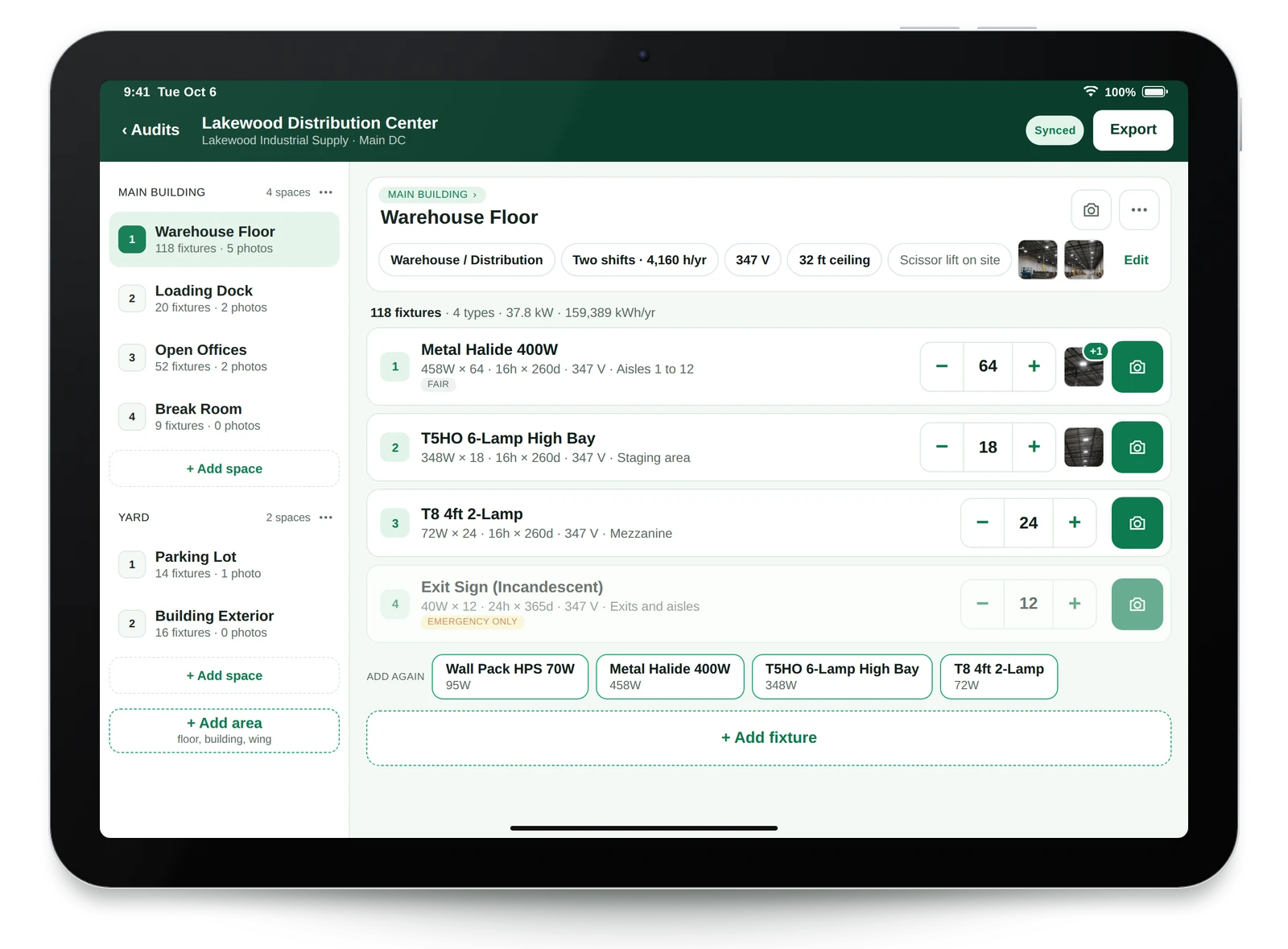
Built for the walk-through
Audit a whole building with no signal.
Cellars, mechanical rooms and core stairwells rarely have a connection. The field app does not need one.
- Saves on the device first. It uploads on its own when you are back online.
- Floors, then rooms. Group spaces by floor or wing so a 20-story building stays easy to read.
- Photos stay with the room. Download them all later as one ZIP, in folders named by space and fixture.
- Ready at the desk. The audit is on your dashboard when you get back, ready to price.
Included on every plan. Runs on iPad, iPhone and Android. iPad and iPhone guide → Android guide →
Your data, in your systems
One CSV with every field.
Many New York teams feed audit data into their own compliance sheets, estimating tools or scripts. The Full Data Export gives them one file that is safe to read by code.
LumaQuote_FullData.csv
| Space | Space type | Space sq ft | Existing fixture | Existing control | Space controls to add | Add vacancy sensors | Add daylight sensors |
|---|---|---|---|---|---|---|---|
| Classroom 2D | Classroom / Training | 850 | T8 4ft 2-Lamp | Wall switch | Vacancy sensor x2, Daylight sensor x1 | 2 | 1 |
| Corridor 2 | Corridor / Hallway | 1200 | T8 4ft 2-Lamp | Always on | Occupancy sensor x3 | 0 | 0 |
| Storage 2A | Storage / Mechanical | 140 | CFL 13W | Occupancy sensor | None needed | 0 | 0 |
8 of 81 columns shown
- 81 columns, one row per fixture line. Audit, retrofit, controls, rebates, installation and notes.
- Fixed column names. New columns are only added at the end, so your script keeps working.
- Sensor counts as numbers. Total the occupancy, vacancy and daylight sensors for a floor or a building in one step.
- Blank is not zero. A blank count means the room was not assessed. A zero means it was, and needs none.
From site walk to signed job
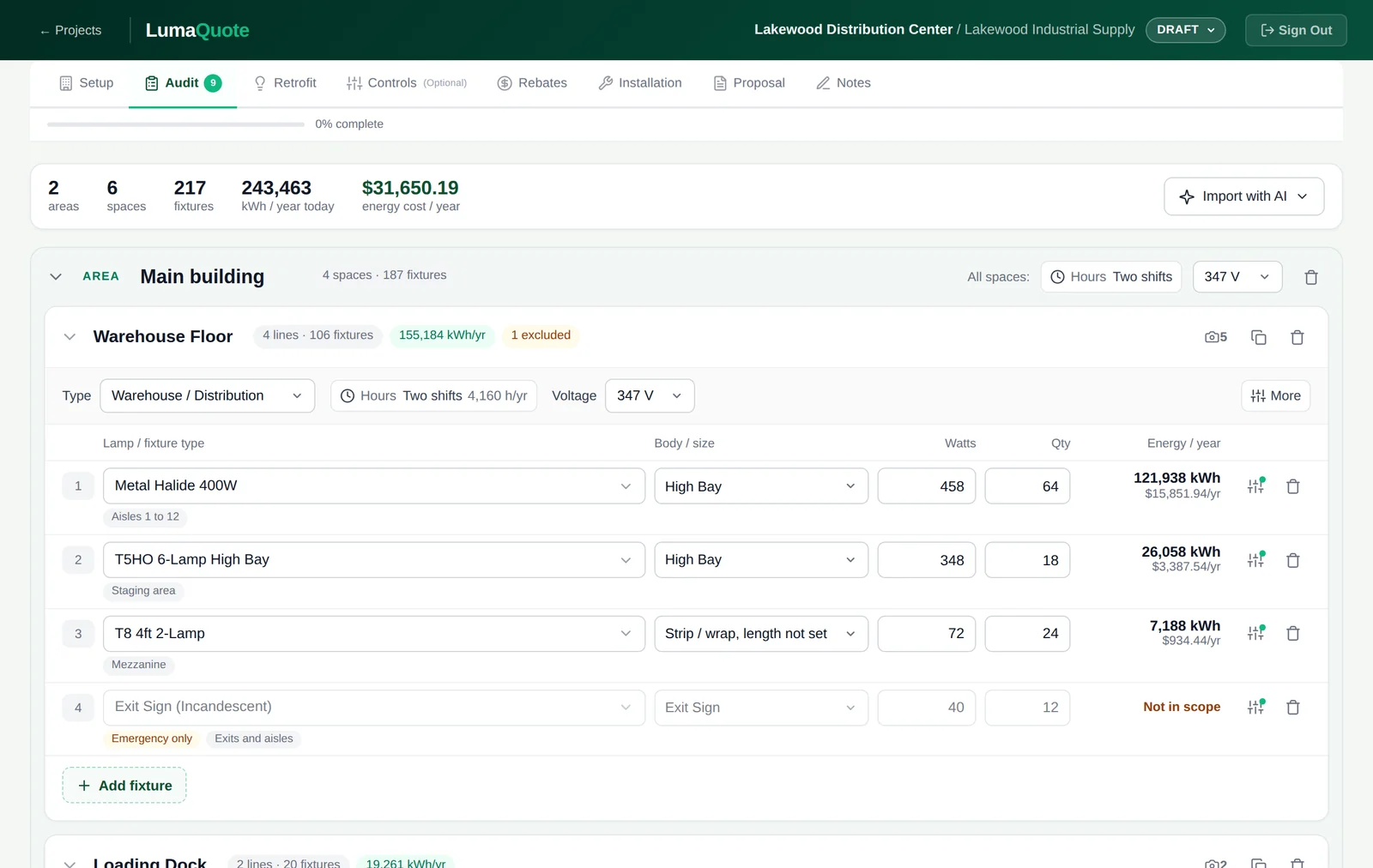
The same audit becomes the proposal.
Nothing is typed twice. The rooms and fixtures from the tablet or phone flow into pricing, savings and the document your client signs.
01
Audit
Rooms, fixtures, controls and photos from the tablet or phone, or typed at the desk.
02
Retrofit
Pick the LED for each fixture type from your own product list.
03
Controls
Optional. Savings are shown three ways: existing, LED only, and LED with controls.
04
Rebates
Enter the incentive per fixture line. Totals and payback update at once.
05
Installation
Price labour by fixture or as a lump sum, with lift and permit lines.
06
Proposal
Send a PDF or a Word file. Your crew gets a work order with no prices.
Best fit
Who uses LumaQuote in New York.
Electrical and lighting contractors
Teams that audit, quote and install. One person walks the building in the morning and the proposal goes out the same day.
Energy consultants and ESCOs
Firms that document buildings for owners. The room-by-room record and the CSV export drop into the reports and tools you already use.
Lighting distributors
Inside sales teams that quote from their own catalogue. Import your products once and every audit prices from your list.
FAQ
Lighting audits in New York: common questions.
Can I record the existing lighting controls for every room?
Yes. In the field app each space has an "Existing controls" record: wall switch, dimmer, occupancy sensor, vacancy sensor, daylight sensor, timer, photocell, lighting panel and more. You tap all that apply. If one fixture in the room is controlled differently, you note it on that fixture only.
Can I note the sensors a room needs, with quantities?
Yes. Each space has a "Controls to add" record with a count for each type: occupancy sensors, vacancy sensors, daylight sensors, dimmers, timers and photocells. A room you checked that needs nothing is marked "None needed", so it is never confused with a room nobody looked at.
Can I export all of the audit data to CSV?
Yes. The Full Data Export is one CSV file with 81 columns and one row per fixture line. It covers areas, spaces, space type, square footage, ceiling height, existing fixtures, hours, existing controls, controls to add, color temperature, retrofit, savings, rebates, installation and notes. Column names are fixed and new columns are only added at the end, so a script or another system can read the file every time.
Does LumaQuote help with Local Law 88 lighting upgrades?
It gives you the room-by-room record a Local Law 88 lighting upgrade starts from: what is installed, how it is controlled, and what you plan to add, with photos. The lighting report itself is certified by a registered design professional or a licensed master or special electrician, who works from that record.
Does the field app work in basements and mechanical rooms with no signal?
Yes. Every count and photo is saved on the tablet or phone first, so you can audit cellars, parking garages and core rooms with no connection. The audit uploads on its own when the device is back online. The first sign-in on a new device needs a connection.
How are Con Edison, National Grid and other utility incentives handled?
You enter the incentive for each fixture line from the current program you are working with, and LumaQuote carries it through the totals, the payback and the proposal. Amounts stay editable, because programs change and every project is approved on its own terms.
How much does LumaQuote cost?
Pricing is published on our website. The Free plan includes 3 complete retrofit proposals and the iPad, iPhone and Android app, with no credit card. Pro is $99 per month or $899 per year and includes unlimited projects and every feature, including controls analysis, rebate tracking and PDF and Word export.
⚡ LumaQuote
Walk the building once.
Have every room on record.
Start on the Free plan and audit your next New York building on the tablet or phone, or book a short demo and we will walk through it with you.
Free plan: 3 proposals, no credit card · Pro: $99/mo or $899/yr · iPad, iPhone and Android app on every plan
Already a customer? Log in →
More: iPad app guide · Android app guide · Local Law 88 room checklist · Retrolux alternative · SnapCount alternative