
Lighting Survey Software for Commercial Retrofit Projects
LumaQuote gives lighting retrofit teams a structured way to survey buildings by area, capture existing fixtures, counts, wattages, run hours and site notes, then carry that field data directly into retrofit selections, savings calculations, costing and client-ready proposals.
3 complete proposals. No credit card required. iPad app included on every plan.
1 Tool from site walk
to finished proposal
0 Re-entry. The survey
feeds the proposal
45 Built-in fixture types,
plus your own
Offline iPad, iPhone and Android surveys
with no signal
LumaQuote Field for iPad, iPhone and Android
The lighting survey app that works with no signal.
Walk the building with a tablet or phone instead of a clipboard. Add each area, count the fixtures and take photos as you go. Back at the office, the survey is already in LumaQuote, ready to price.
- Saves on the device first. Basements, garages and steel warehouses are no problem. It uploads when you are back online.
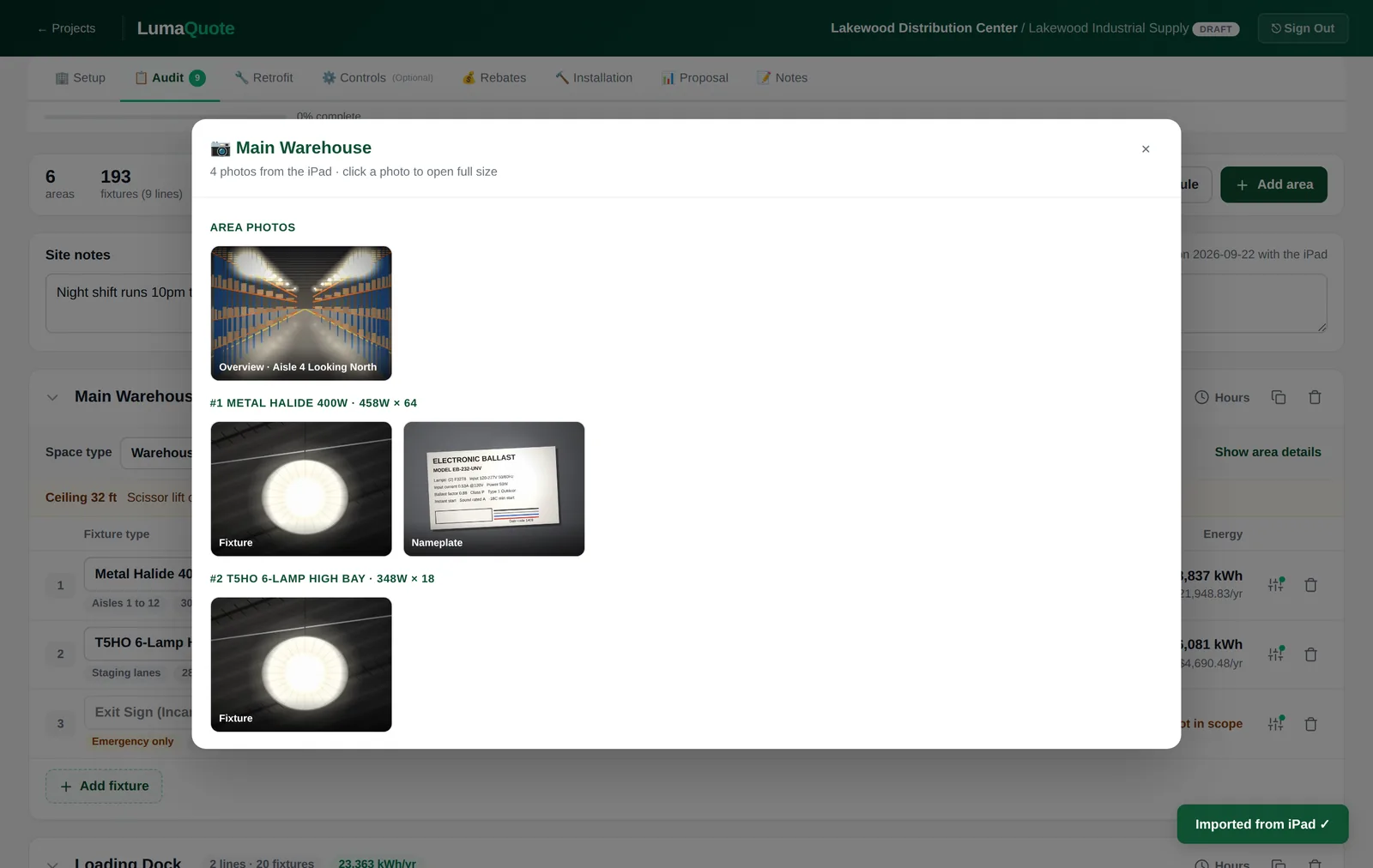
- Photos filed by area and fixture. Fixture, nameplate and ceiling shots stay with the right line, so the estimator never has to guess.
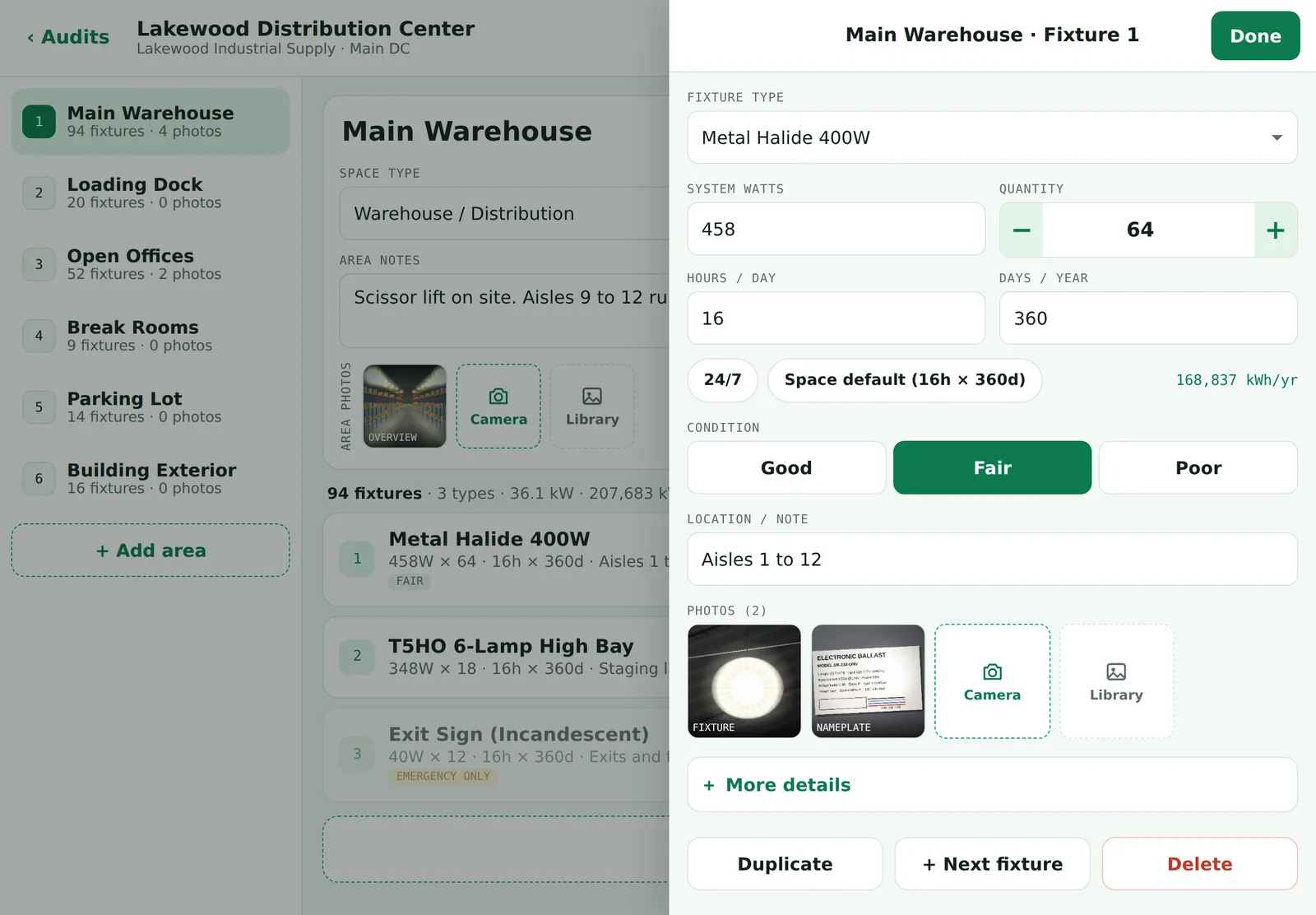
- Made for ladders and lifts. Big buttons, plus and minus quantities, and hours that fill in from the space type.
- Imports on its own. Open your LumaQuote dashboard and new surveys are there, with site notes and photos.


Included on every plan. Runs on iPad and iPhone (iOS 15 or later) and Android (7 or later). Lighting audit app → iPad and iPhone guide → Android guide →
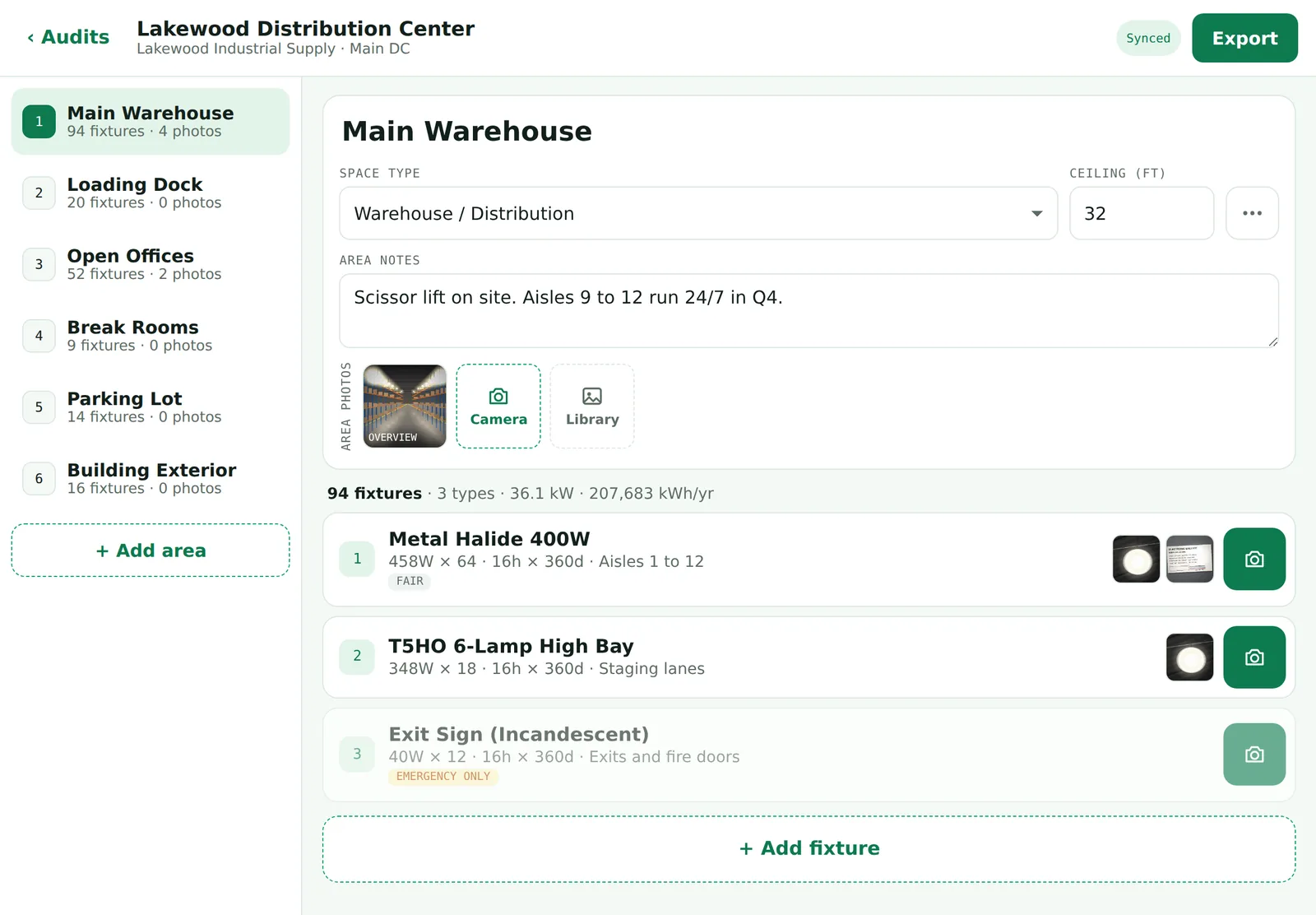
Also on iPhone and Android phones
The same app runs on iPhone and Android phones, with the same areas, fixtures and photos. Get it from the App Store or Google Play.


Site walk workflow
How a LumaQuote lighting survey works.
One area at a time. One line per fixture type. Energy use calculates as you go.
01
Start the survey
Open the app on your tablet or phone and tap + New audit. Add the client, site and auditor. It takes under a minute.
No iPad, iPhone or Android? Enter the survey in LumaQuote on any laptop or tablet
02
Add areas as you walk
Name each space as you enter it: Warehouse Aisles 1 to 12, Office Level 2, Parking P1. Pick the space type, note the ceiling height and anything the install crew needs to know.
The space type sets typical operating hours for you
03
Count each fixture type
Pick the fixture type and the wattage fills in. Set the quantity with plus and minus, check the hours, and the kWh per year shows right away. Tap + Next fixture and keep going.
Duplicate a line or a whole area for repeated spaces
04
Take photos where they belong
Photograph the fixture, the ballast nameplate and the ceiling from the fixture sheet. Each photo is filed under its area and fixture line automatically.
Area photos for overviews, fixture photos for details
05
Flag condition and scope
Mark each line Good, Fair or Poor. Set the scope when a line should not be retrofitted: Already LED, Leave as-is, Emergency only and more. Out-of-scope lines stay on record but drop out of the savings.
Mounting height and existing controls help plan lifts and controls
06
Sync, then price it at the desk
The survey uploads when the device has signal and appears in your LumaQuote dashboard with notes and photos. Open the Retrofit tab, pick the LED replacements, add rebates and export the proposal.
Proposal export to PDF and Word
What gets captured
Every field you need on site. Nothing you don't.
The essentials are always on screen. Everything else is one tap away, so a simple survey stays simple.
Every fixture line, always visible
Fixture type Searchable list
System watts Fills from type
Quantity Drives savings
Hours per day Drives savings
Days per year Drives savings
Fixture details, when needed
Location or bay Shown on the line
Condition Good, Fair, Poor
Scope Excludes from savings
Mounting height Lift planning
Existing control Controls review
Photos Field app
Every area
Space type Typical hours
Ceiling height and notes Install planning
Enclosed space Controls fit
Daylight available Controls fit
After-hours use Controls fit
Zero re-entry
Survey data flows straight into the proposal.
What you capture on site is used in every step after it. No export, no copy and paste, no separate file.
Lighting survey
On a tablet, a phone or in the browser. Fixtures, hours, condition, scope, photos
Retrofit
LED type, watts, cost and rebate for each line
Controls
Optional. Uses the area details from the survey
Rebates and install
Built from the retrofit lines
Proposal
PDF and Word export
Fixture library
Every common commercial fixture, built in.
Start typing to search. Pick a type and the system wattage fills in. You can always change it.
Fluorescent
T8 4ft 1 to 4 lamp · T8 2ft · T8 8ft · T12 4ft 2 and 4 lamp · T12 2ft · T12 8ft · T5 4ft · T5HO 4ft 2 and 4 lamp · T5HO 6-lamp high bay
HID
Metal halide 70W to 1000W · HPS 70W to 400W
Compact, incandescent and halogen
CFL 13W · CFL 23W · CFL 42W PL · CFL 6in downlight · Incandescent 60W and 100W · Halogen MR16 · PAR30 · PAR38 · Halogen downlight
Specialty and exterior
Vapor tight 4ft · Wall pack HPS · Shoebox 250W and 400W · Flood MH 400W and 1000W · Recessed can BR30 and BR40 · Exit sign
+ Don't see your fixture? Choose Custom fixture and enter any name and wattage. Save it to My Library to reuse it, or import your supplier price list from Excel or CSV.
Why switch
The clipboard and spreadsheet problem.
Paper and Excel survey
✗ Write it down, retype it later
Counts on paper, then hours at the desk moving them into Excel. Every fixture is handled twice, and every retyped number is a new chance for an error.
✗ Photos in a camera roll
Hundreds of pictures with no area or fixture attached. Someone has to sort them before anyone can use them.
✗ Formulas break, totals drift
One formula points to the wrong cell and the totals stop matching. You hunt for the problem before you can start the proposal.
✗ The proposal is a separate file
Copy the numbers, format the table, build the chart. Hours of admin after a full day on site.
LumaQuote lighting survey
✓ Enter it once, on site
One line per fixture type as you walk. kWh and cost calculate as you go. The survey is done when the walk is done.
✓ Photos filed automatically
In the field app, every photo is saved under its area and fixture line and shows up on the desktop the same way.
✓ No formulas to break
LumaQuote calculates kWh, savings, payback and 10-year cash flow from your inputs, so the totals always match the lines.
✓ The proposal builds from the survey
Pick the LED replacements, add rebates and installation, and export. No copying numbers between files.
Speed up every survey
Save your best surveys as templates.
Surveying a chain of restaurants, a school board or a portfolio of retail sites? Save a project as a template. The areas, fixtures, hours and pricing carry over, so each new survey starts half done.
- Duplicate an area for identical bays and floors
- Duplicate a fixture line and change only what differs
- Save any project as a named template and reuse it for new clients
- Version history to snapshot and restore a project
Project templates
Warehouse, MH high bay + T8 Use →
Retail strip, T8 fluorescent Use →
Office building, open plan Use →
+ Save current project as template
Common questions
Lighting survey software FAQ.
What is lighting survey software?
Lighting survey software helps contractors, energy auditors and lighting professionals record the existing lighting in a commercial building during a site walk. It captures fixture types, wattages, quantities, locations and operating hours for each area, then calculates energy use automatically. LumaQuote goes one step further: the survey feeds straight into the LED retrofit proposal, so nothing is typed twice.
Is there a lighting survey app for iPad, iPhone and Android?
Yes. LumaQuote Field is our iPad, iPhone and Android app for lighting surveys. It is on the App Store and Google Play and included on every LumaQuote plan, the Free plan too. You add areas, fixture types, quantities, hours, condition and photos while you walk the building. When the device is back online, the survey uploads and appears in your LumaQuote account, ready to price.
Does the lighting survey work without internet?
The iPad, iPhone and Android app does. Every fixture count and photo is saved on the device first, so you can survey basements, parking garages and steel warehouses with no signal. The survey uploads on its own when the device is back online. The first sign-in on a new device needs a connection. The web version of LumaQuote needs an internet connection.
Can I do the survey on a laptop or other tablet?
Yes. LumaQuote runs in the web browser on any laptop or tablet, with nothing to install. The Audit tab uses one row per fixture with a searchable fixture list, so you can enter a survey on site or from your notes back at the office. Photo capture and offline work need the iPad, iPhone and Android app.
What data does LumaQuote capture during a lighting survey?
For every fixture line: fixture type, system watts, quantity, hours per day and days per year. In the fixture details: location or bay, condition (Good, Fair, Poor), scope (In scope, Already LED, Leave as-is, Excluded, Emergency only, Damaged / Repair, Customer exception), mounting height, existing control and notes. For every area: space type, ceiling height, area notes, and whether the space is enclosed, has daylight or is used after hours. The field app adds photos of fixtures, nameplates and ceilings, filed under the right area and fixture.
Does the survey data go into the proposal automatically?
Yes. A survey entered on the desktop is already in the project. A survey from the tablet or phone imports into your LumaQuote dashboard automatically, with site notes and photos. In the Retrofit tab every surveyed fixture is waiting for its LED replacement. Add rebates and installation costs, then export the proposal. If the survey changes on the tablet or phone later, updating it keeps the edits you already made on the desktop.
How is LumaQuote different from other lighting audit apps?
Many lighting audit apps stop at the survey report, and the proposal is built somewhere else. With LumaQuote the same survey carries through retrofit, optional controls, rebates, installation and the proposal, in one project. You can try it on the Free plan with up to 3 complete proposals, no credit card required.
LumaQuote
Walk the building.
Leave with the proposal.
Survey on the tablet or phone, price it at the desk, send the proposal the same day. Nothing typed twice.
Free plan: 3 complete proposals, no credit card · Pro: $99/month or $899/year · iPad, iPhone and Android app included on every plan
Already a customer? Log in →