Built for US and Canadian contractors · AI-powered · Team accounts
Quote
lighting retrofits.
In under an hour.
LumaQuote turns a lighting site walk into a professional retrofit proposal, complete with AI-powered audit import, accurate savings math, rebate tracking, and PDF output. No spreadsheets. No back-and-forth. Just close the job.
Start free See How It Works ↓
3 proposals free · No credit card required
7
Steps from site audit
to finished proposal
3
Complete proposals
on the Free plan
15+
US and Canadian regions
with built-in utility rates
Offline
iPad, iPhone and Android audits with no signal. Pricing on any computer.
The old way
Sound familiar?
Clipboard audit, Excel transfer
You count fixtures on paper, then retype everything into a spreadsheet. One typo kills the whole proposal.
4 to 8 hours per proposal
By the time you've built the savings table, the rebate calculation, and formatted the Word doc, half a day is gone.
Math you can't defend
When a client questions a number, you have to re-open three files to find where it came from. Assumptions buried everywhere.
Rebates calculated manually
State, provincial and utility programs change. You're Googling rates mid-proposal and hoping the numbers are still current.
The LumaQuote way
Seven steps. One session.
Start at Setup and walk through to Proposal. Your proposal is built as you go. Every field feeds into the final numbers automatically.
01
Setup
Client info, facility details, utility rate, markups. Pick your region and the rate fills automatically.
02
Audit
Enter existing fixtures in compact rows. Type, watts, quantity, hours. kWh/yr calculates live per fixture.
03
Retrofit
Pick the LED replacement. Enter watts and cost. See the savings per fixture instantly.
04
Controls
Optional. Add occupancy, daylight, scheduling. LED-only vs LED+Controls shown side by side.
05
Rebates
Adjust per-fixture rebate amounts. Toggle the program on or off globally.
06
Installation
Labor, disposal, lift rental, permits. Choose a per-fixture breakdown or lump sum.
07
Proposal
Full proposal with payback, ROI, 10-year cash flow, CO₂ impact. Export PDF or Word in one click.
LumaQuote Field for iPad, iPhone and Android
The lighting audit app for iPad, iPhone and Android
Walk the building with a tablet or phone instead of a clipboard. Count fixtures area by area, photograph every fixture and ballast nameplate, and note ceiling heights, mounting and controls. The audit lands in LumaQuote, ready to price as an LED retrofit proposal. Nothing to retype.
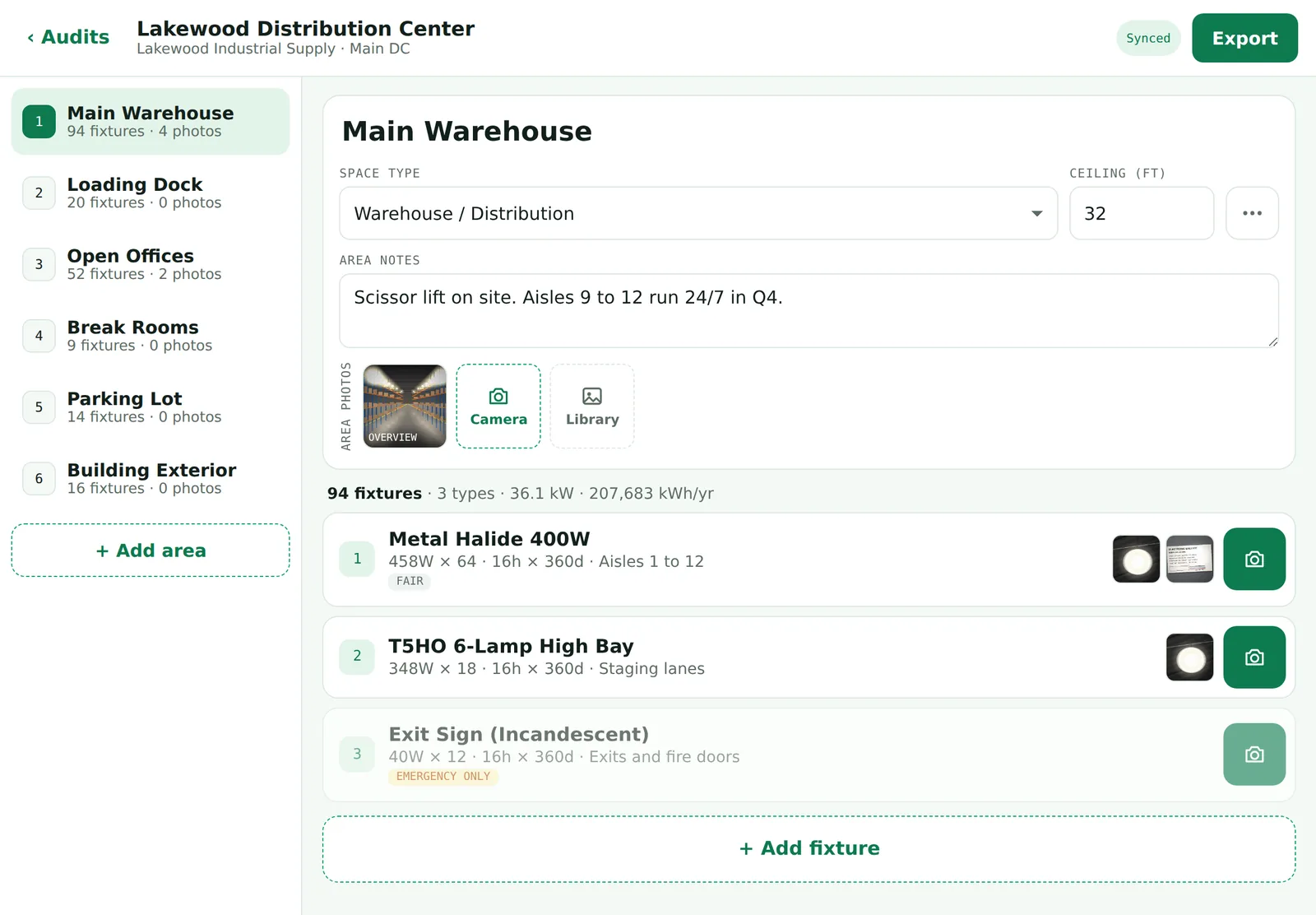
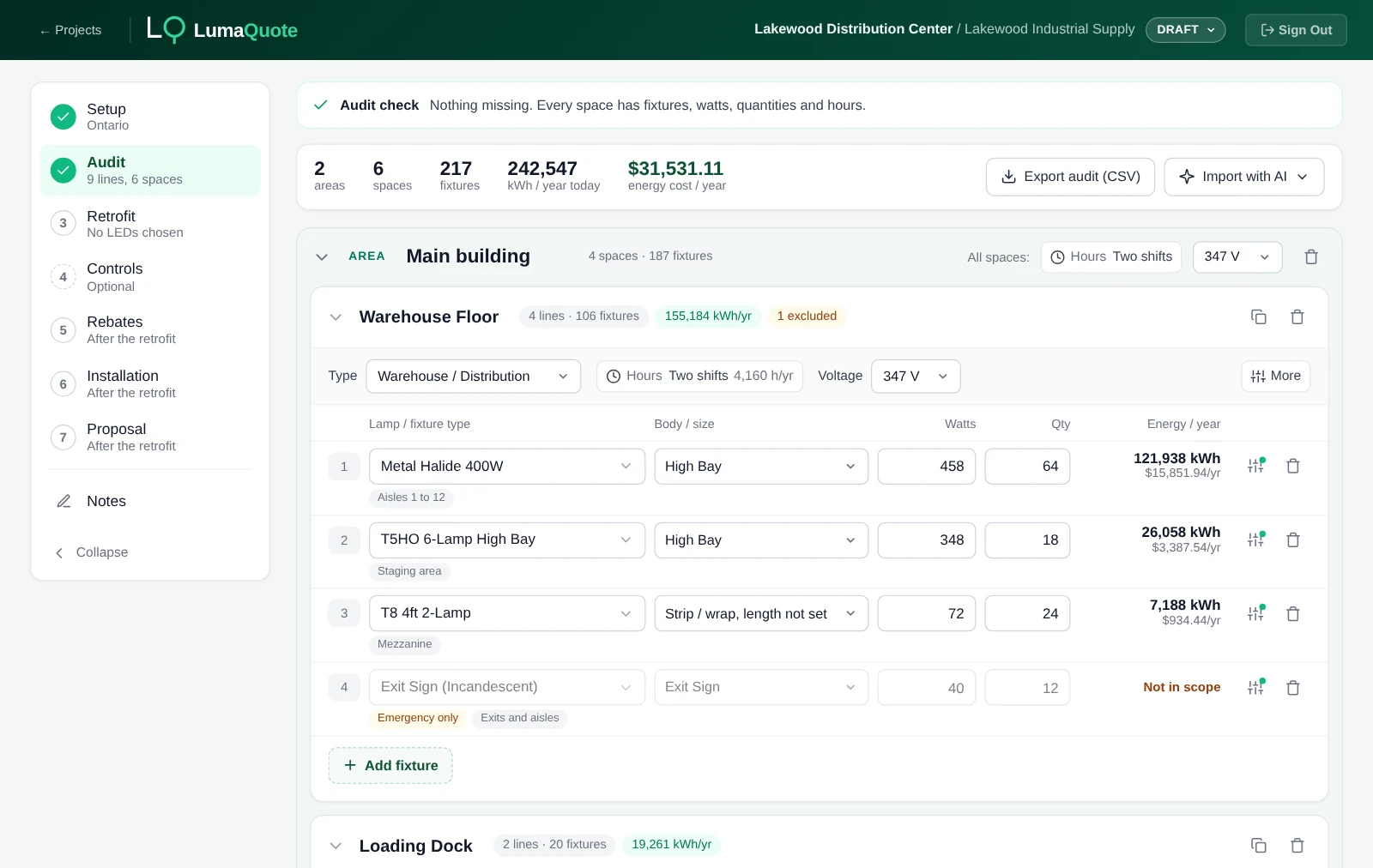
Works offline, on site
Basements, parking garages and steel warehouses kill the signal. Every count and photo saves on the device first and uploads when you are back online.
Photos tied to each fixture
Snap the fixture, the nameplate and the ceiling. Each photo is filed under its area and fixture line, so the office never has to guess which picture goes where.
Built for ladders and lifts
Large tap targets, plus and minus quantity buttons, and hours that fill in from the space type. Log a 60-fixture aisle in seconds, one hand free.
Lands on your desktop
Open LumaQuote at the office and the audit is already there, with site notes and photos. Keep editing on either side. Changes merge instead of overwriting.
- Audit on iPad, iPhone or Android Areas, fixture types, quantities, hours, condition and photos.
- Sync when you have signal Uploads on its own. Your audits stay private to your account.
- Price it on the desktop Pick LED replacements, controls and rebates, then send the proposal.
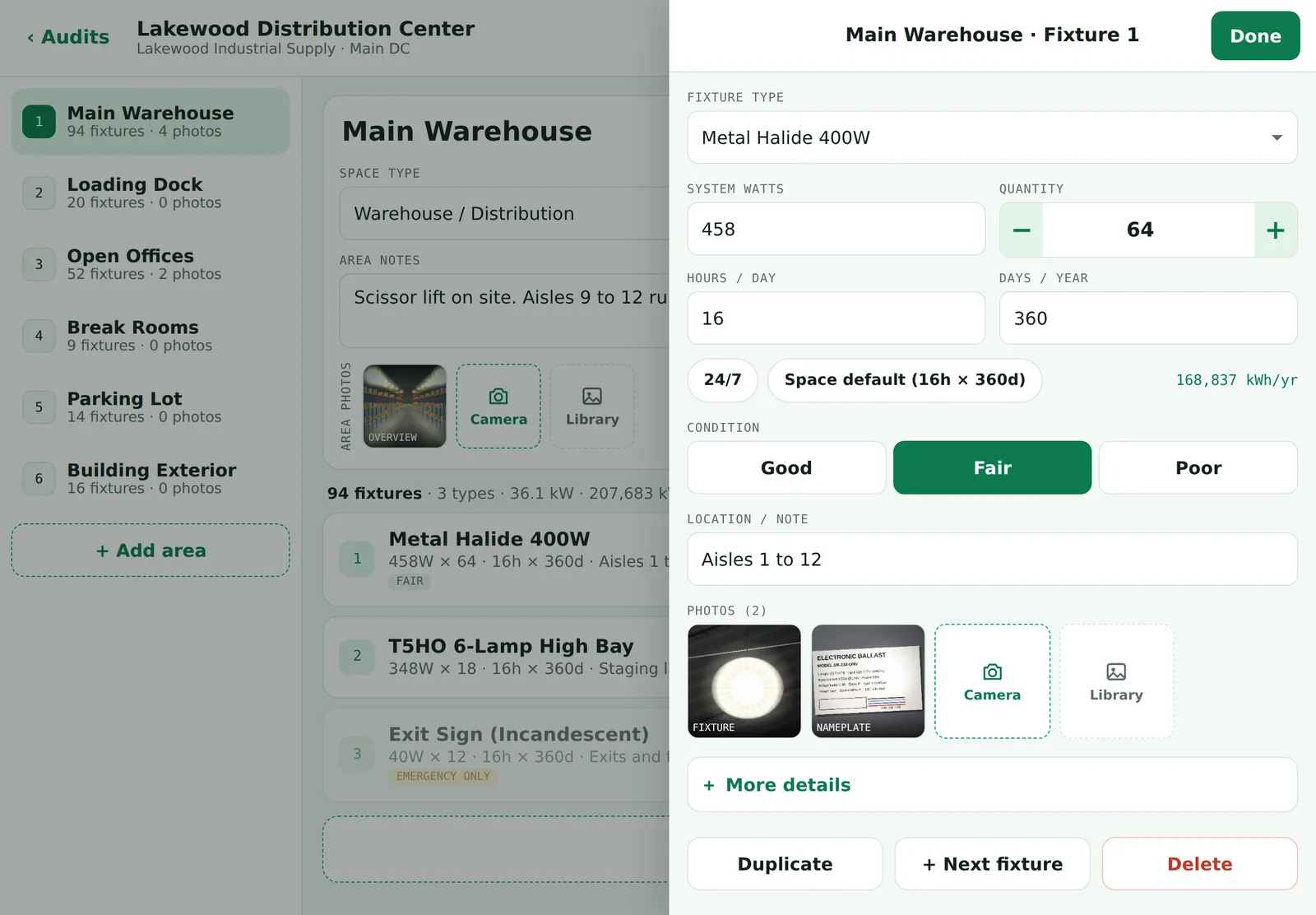
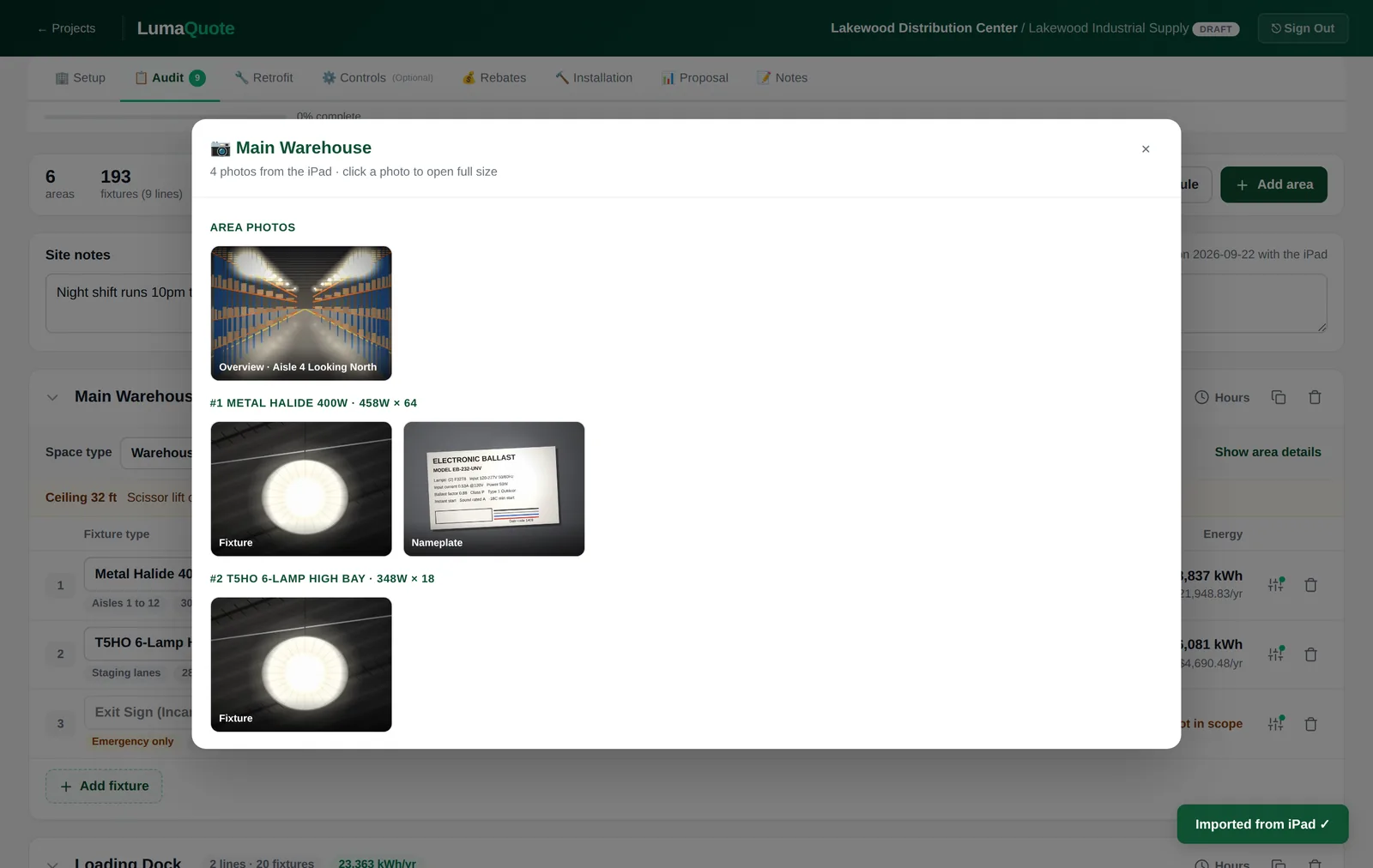
Also on phones. The same app runs on iPhone and Android phones, with the same audits. Get it from the App Store or Google Play.


See the lighting survey app

 Included on every plan. Runs on iPad and iPhone (iOS 15 or later) and Android (7 or later) and works offline. iPad and iPhone guide → Android guide →
✦ New
AI-Powered
Stop retyping data you already have.
Three AI tools are built directly into LumaQuote. They work inside the audit and proposal workflow you already use. The proposal writer is on every plan. Photo and document import are included in Pro.
✦ AI-POWERED
01
AI Audit Import
Take a photo of your handwritten notes, a printed fixture schedule, or an equipment nameplate. AI reads it and fills in your audit automatically. No re-typing. No second pass through the data.
Handwritten notes · Fixture schedules · Nameplates
✦ AI-POWERED
02
Import Bid Document
Upload a PDF, Word doc, or spreadsheet. AI reads the fixture schedule and imports all areas and quantities automatically. If you already have a bid doc, you're done entering data.
PDF · Word doc · Spreadsheet
✦ AI-POWERED
03
AI Proposal Writer
Generate a professional cover letter and terms & conditions in one click, written around your specific project data, savings figures, client name, and region. Edit anytime before export.
Cover letter · Terms & conditions · One click
Who uses LumaQuote
Built for the teams that quote lighting retrofits.
The same audit, pricing and proposal workflow, set up around how each team works.
Turn a customer's fixture schedule and your branch price list into a retrofit proposal with installed cost, savings, rebates and payback. Import up to 5,000 products as your cost or your selling price. Existing, LED only and LED plus controls are kept separate, with the assumptions on the proposal. Auditors, estimators and an owner work in one Team account, and the utility's application file is filled from the same project. Walk the site with the field app, price the LED and installation work, and send a PDF or Word proposal the same day. The installer gets a work order with no prices.Lighting and electrical distributors
ESCOs and energy teams
Electrical contractors
Utility rebate applications
LumaQuote fills the program's own application file.
The fixture lines you already priced go into the utility's spreadsheet or PDF form, so nobody retypes the schedule. A totals check compares fixtures, watts and dollars in the file with the project before you submit.
- Verified, on every plan Energy Trust of Oregon, Idaho Power, NHSaves, BGE and Rhode Island Energy.
- Any other program, on Pro and Team Drop the program's Excel file or fillable PDF and LumaQuote fills the fixture table. Tested on forms from Efficiency Manitoba, efficiencyPEI, Lansing BWL, Focus on Energy and Tucson Electric Power.
- Program guides US and Canadian programs, from Save on Energy and BC Hydro to ComEd and National Grid. All guides →
What's inside
Everything a retrofit proposal needs.
Fast enough to use on-site
Each fixture is a single compact row. Select the type from a dropdown. Watts pre-fill, but you always type the actual measured value. Quantity, hours, days. That's it.
- All common fixture types: T8, T12, T5HO, Metal Halide, HPS, CFL, Halogen, and more
- kWh/yr and $/yr calculated live per fixture
- Location, condition, and scope status hidden behind
···, only when you need it - Bulk hours tool lets you set all fixtures in an area at once
- Area grouping with collapsible sections
Simple LED entry, instant savings
Select the LED type from a categorized dropdown. Watts and cost pre-fill from your catalog, but you can override everything. Savings show below each fixture as you type.
- LED categories: Tube, Panel, High Bay, Lamp, Outdoor, Specialty
- Wattage, qty, unit cost, and rebate per fixture
- Live per-fixture savings: watts reduced, kWh/yr, $/yr
- Catalogue number and data sheet link carried into the proposal and the work order
- Excluded fixtures tracked and shown in the final proposal
Controls as an opportunity layer
Controls are completely optional. When you add them, savings are calculated separately from the LED baseline, so you can show LED-only vs LED+Controls side by side and let the client choose.
- Per-area fit assessment: High fit / Possible / Needs review / Not likely
- Occupancy sensing, daylight harvesting, scheduling, high-end trim
- Layered savings math: trim → occupancy → daylight → scheduling
- Incremental controls payback calculated separately
- Space type used to auto-suggest which controls apply
A proposal your client will trust
One click generates a complete, branded proposal. PDF and Word format both included. No formatting, no copy-paste, no last-minute scramble.
- Cover page, cover letter, executive summary
- Payback, ROI, 10-year cash flow, financing
- Energy comparison charts (existing vs LED vs LED+Controls)
- CO₂ reduction, trees equivalent, cars off road
- Full fixture schedule (existing and proposed)
- Assumptions section makes every number traceable
- Terms, conditions, and signature lines
Keep your pipeline organized
LumaQuote is also a lightweight CRM for your retrofit pipeline. Track every project from first audit to closed deal.
- Pipeline stages: Draft → Sent → Won → Lost → Revision
- Dashboard with filter by stage and quick stats
- Project templates let you save your best projects as starting points
- Version history lets you snapshot and restore any project state
- Internal notes for pricing decisions, scope changes, and client requests
- Duplicate projects and areas for similar facilities
Your whole team in one account
For companies with several auditors and estimators. Assign each building to one person, review it before it goes out, and keep every proposal on the same brand and price list.
- Roles: Owner, Estimator and Auditor. Auditors see only their own projects
- One person edits a project at a time. Everyone else opens it view only
- Hand off or take over in one click. A project that changed elsewhere reloads first, so nothing is overwritten
- Comments on the project or on a single space
- "Assigned to me" filter and the editor's name on every project
- Logo, terms, prices, products and templates come from the company account
- Audits from your team's tablets and phones show up for owners and estimators, ready to bring in
LumaQuote Team: $349/mo for 3 users, or $3,490/yr. Extra users $69/mo.
✦ AI-Powered
Three AI tools. No add-ons.
The proposal writer is on every plan. Photo and bid document import are included in Pro, with no add-ons and no usage billing. They're built into the same workflow you already use.
- AI Audit Import: Snap a photo of handwritten notes, a printed fixture schedule, or an equipment nameplate. AI fills in your audit automatically.
- Import Bid Document: Upload a PDF, Word, or spreadsheet. AI reads the fixture schedule and imports all areas and quantities with zero re-entry.
- AI Proposal Writer: Generate a professional cover letter and terms & conditions in one click, written around your project data and client details.
Built for North America
US & Canada
rates built in.
Pick your state or province and LumaQuote automatically sets the utility rate, CO₂ factor, demand charge, and rebate program name. Every region from California to Ontario, Texas to Manitoba.
USNortheast US USCalifornia USTexas USSoutheast USMidwest USSouthwest USWest US CAOntario CAQuebec CABC CAAlberta CAManitoba CASaskatchewan CANova Scotia CANew Brunswick
Northeast US: auto-filled values
Rate $0.22/kWh
Demand charge $12/kW/mo
CO₂ factor 0.25 kg/kWh
Rebate program Utility Rebate
Pricing
Start free. Go Pro when you need more.
The Free plan covers 3 complete proposals, no credit card needed. Pro adds unlimited proposals, controls analysis and AI import. Team puts 3 or more people on one company account.
Free plan
3 complete proposals · PDF and Word export · iPad, iPhone and Android app · AI Proposal Writer
Pro, month-to-month
$99 /month
Cancel anytime. No commitment.
- ✓ 1 user
- ✓ Unlimited projects & proposals
- ✓ Full audit and retrofit workflow
- ✓ Controls analysis layer
- ✓ Rebate tracking
- ✓ One-click PDF + Word export
- ✓ US and Canada utility rates built in
- ✓ Project templates & version history
- ✓ CSV data export
- ✦ AI Audit Import
- ✦ Import Bid Document
- ✦ AI Proposal Writer
No credit card required to start
Best Value
Pro, billed annually
$75 /month
$899 billed once a year
You save $289 vs monthly billing
- ✓ Everything in monthly, with nothing held back
- ✓ 1 user
- ✓ Unlimited projects & proposals
- ✓ Full audit and retrofit workflow
- ✓ Controls analysis layer
- ✓ Rebate tracking
- ✓ One-click PDF + Word export
- ✓ US and Canada utility rates built in
- ✓ Project templates & version history
- ✦ AI Audit Import
- ✦ Import Bid Document
- ✦ AI Proposal Writer
No credit card required to start
LumaQuote Team
$349/mo for 3 users, or $3,490/yr · extra users $69/mo · roles, assignment and review
How does LumaQuote compare?
LumaQuote vs Retrolux See the comparison → LumaQuote vs SnapCount See the comparison → LumaQuote vs Lighting Assessor See the comparison → LumaQuote vs ecoInsight See the comparison →
LumaQuote Free to start, then $75/mo billed annually · PDF + Word proposals · US and Canada rates
LumaQuote
Your next proposal
starts today.
Built for distributors, ESCOs and contractors across the US and Canada who want to replace spreadsheets with a tool that fits how they work.
3 proposals free · No credit card · Setup in 5 minutes
Already have an account? Log In →